Access Argo CD
This chapter describes the prerequisites for accessing Argo CD from different components. It covers:
-
Accessing Argo CD via its Kubernetes Ingress or OpenShift Route (Web UI or CLI)
-
Enabling Argo Workflows to interact with the Argo CD API
For this, following Kubernetes Secrets are required.
TLS Secret for external access
To enable TLS for accessing Argo CD (via Web UI or CLI), a valid TLS certificate must be provided.
For Kubernetes Ingress, this certificate can either be manually created as a Kubernetes Secret or automatically provisioned using cert-manager on the Argo CD Ingress.
For the OpenShift Route, provide the Secret yourself or manage an explicit Certificate targeting the desired secret to put the certificate.
See OpenShift certificate provisioning; On OpenShift, Route annotations alone do not provision a certificate.
Requirements
-
Secret must be named
argocd-server-tls. -
Secret must exist in the same namespace as Argo CD.
-
Contain the following keys:
-
tls.crt: PEM-encoded server certificate (optionally including the certificate chain) -
tls.key: PEM-encoded private key
-
The argocd-server-tls Secret must exist before enabling TLS in the Argo CD configuration.
Create the TLS Secret
apiVersion: v1
kind: Secret
metadata:
  name: argocd-server-tls
  namespace: <namespace>
type: kubernetes.io/tls
stringData:
  tls.crt: |
    -----BEGIN CERTIFICATE-----
    <server-cert-pem>
    -----END CERTIFICATE-----
  tls.key: |
    -----BEGIN PRIVATE KEY-----
    <server-key-pem>
-----END PRIVATE KEY-----|
The For Ingress-based issuance (Kubernetes cluster), If cert-manager is used, configure the appropriate issuer and annotations in the Argo CD Helm chart values. cert-manager will then automatically create and manage the See the Argo CD Helm Chart Values for an example of how to configure TLS and cert-manager annotations for the Argo CD Server Ingress component. |
Deployment Account Token Secret
To enable Argo Workflows to interact with the Argo CD API (for example, to synchronize applications and monitor health status), an API token is required. A Kubernetes Secret must be created containing this token for the Argo CD account that will be used for deployment.
This token provides authentication for automation processes during PAS-X MES system deployment.
|
Deployment account token secret must be configured before bootstrapping and deploying PAS-X MES. |
Requirements
-
The Secret must be named
argocd-workflow-token, this name is used in workflows to get the token. -
Secret must exist in the same namespace as Argo Workflows.
-
Secret must be of type
Opaque. -
Contain the following key:
-
ARGOCD_AUTH_TOKEN: which holds the Argo CD deployment account token
-
Generating the Argo CD API Token
There are two approaches to generate Argo CD API token:
Approach 1: Using the Argo CD CLI
If you have access to the Argo CD CLI and the required permissions, you can generate the token via the following command:
argocd account generate-token --account <deployment-account-name>Replace <deployment-account-name> with the name of the Argo CD account that will be used for deployment.
|
If you are using the Körber-provided Helm chart, the default name for the Argo CD deployment account will be |
Approach 2: Using the Argo CD UI
Alternatively, you can generate the token using the Argo CD web interface:
-
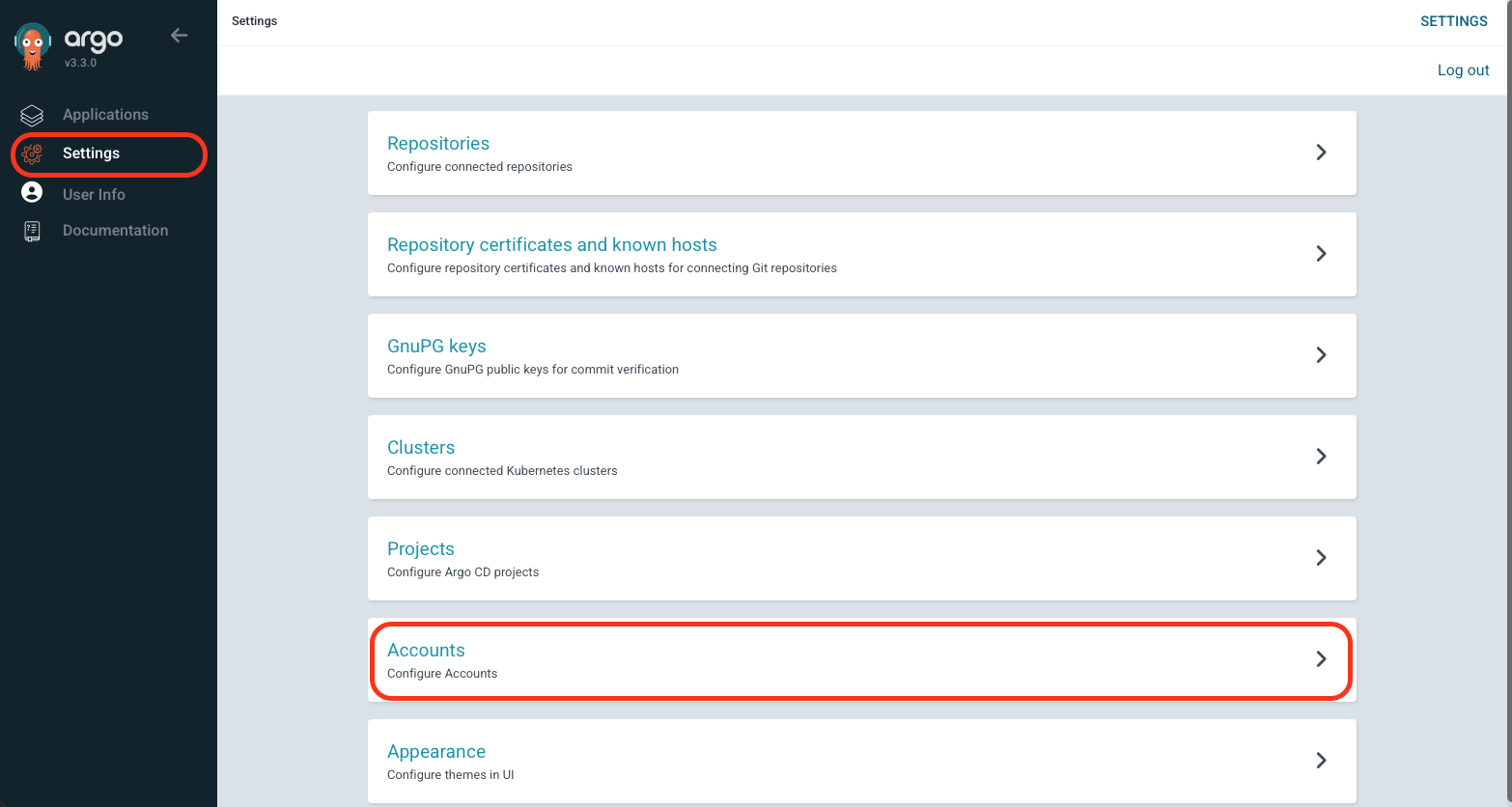
Open the
Settingstab from the Argo CD sidebar and navigate to theAccountssection.
-
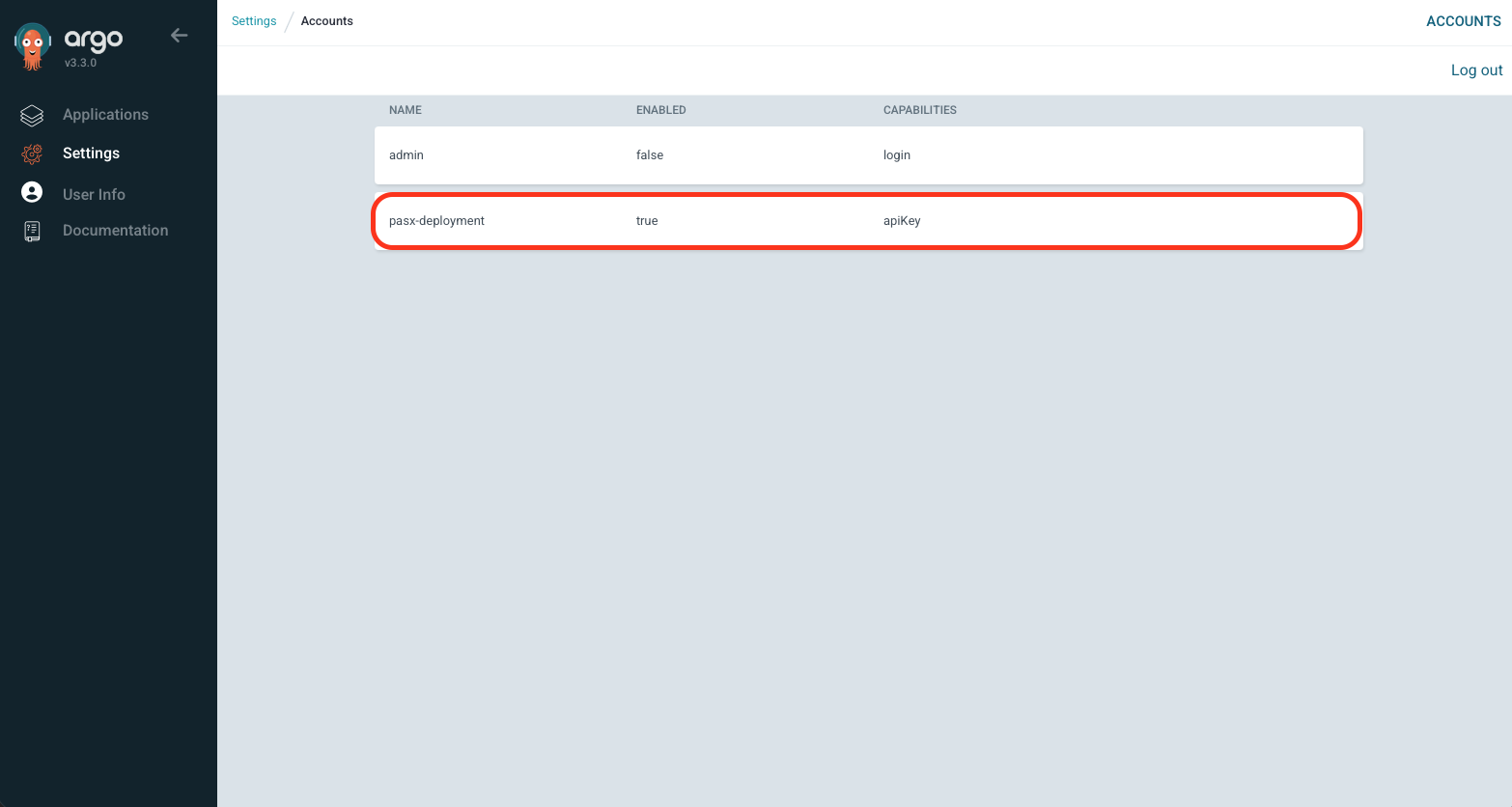
Select the account for which you want to create a token.
-
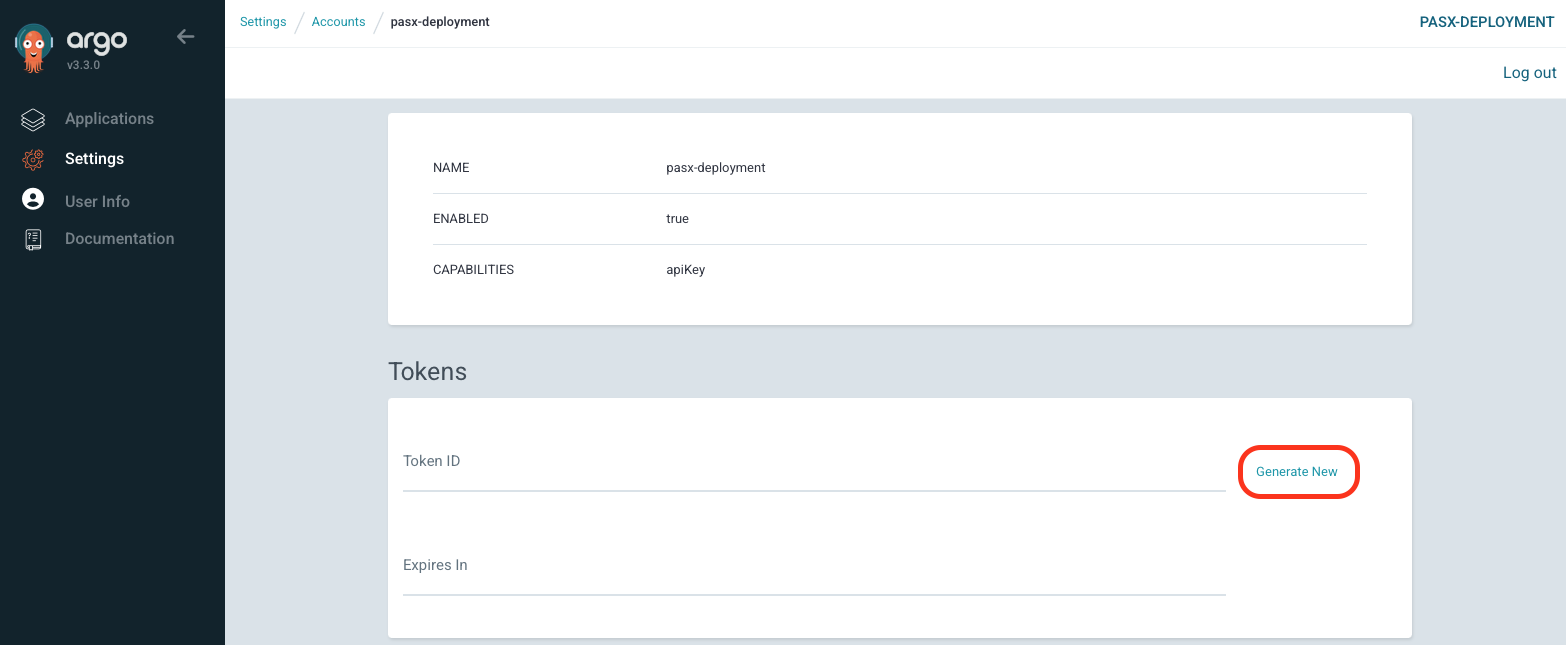
Click on the
Generate Newbutton and copy the generated token.
Create the Deployment Account Token Secret
Once you have generated the token, it must be stored in a Kubernetes Secret named argocd-workflow-token.
apiVersion: v1
kind: Secret
metadata:
  name: argocd-workflow-token
  namespace: <namespace>
type: Opaque
stringData:
  ARGOCD_AUTH_TOKEN: >-
<argo-cd-token>| Without this secret, Argo Workflows cannot authenticate against the Argo CD API and the installation process fails. The Secret name and key must be exactly the same as described. |