Architecture
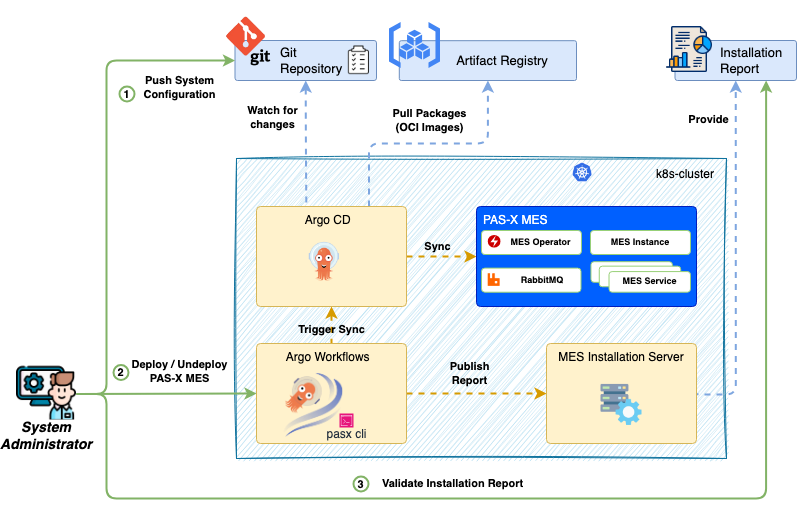
How it all fits together
The diagram above shows the key actors and their relationships. The flow is not strictly sequential — reconciliation loops run continuously and workflows can be triggered independently — but the following describes the typical path:
-
A system administrator pushes the desired state — chart references and configuration values — to the Git repository.
-
Argo CD detects the change, pulls the referenced chart versions from the artifact registry, and applies the resulting Kubernetes resources to the cluster.
-
Argo Workflows executes the multi-step installation or update procedure, coordinating the steps that cannot be expressed as a single reconciliation.
-
The MES Operator reconciles the MES Instance and MES service Custom Resources into the running PAS-X MES workloads.
-
At the end of the procedure, the MES Installation Server publishes the Installation Report for administrator review.
SmartInstall
SmartInstall drives the installation, keeps the system in its declared state, and records the outcome.
Argo CD
Argo CD is the GitOps controller used by SmartInstall. It watches the Git repository that holds the desired state, pulls the referenced chart versions from the artifact registry, and applies the resulting Kubernetes resources to the cluster. Argo CD continuously watches for changes but reconciliation of multi-step logic is coordinated by Argo Workflows.
For details, see Argo CD.
Argo Workflows
Argo Workflows executes the multi-step logic that cannot be expressed as a single declarative reconciliation — the ordered, conditional sequences that make up an installation, update, or undeploy procedure.
For details, see Argo Workflows.
MES Installation Server
The MES Installation Server captures the Installation Report produced at the end of each workflow run and makes it accessible to administrators for review and audit.
MES
MES includes the operator that manages PAS-X MES and the workloads that constitute the running system.
MES Operator
The MES Operator reconciles the PAS-X MES Custom Resources — the MES Instance and the MES service definitions — into the concrete Kubernetes workloads, services, and supporting resources required to run the system.
For details, see MES Operator and Custom Resource Definitions.
MES Instance
The MES Instance is a single Custom Resource per namespace that owns the configuration shared across all MES services. It is created by the Helm chart applied by Argo CD and then reconciled by the MES Operator.
Optional applications
Optional applications are disabled by default.
They can be enabled per installation through the MES Applications chart values, under the components key.
See the MES Applications configuration for the full schema.
API Gateway
The API Gateway provides a single ingress point for external access to PAS-X MES API. It is configured via the API Gateway configuration.
OpenTelemetry Collector
The OpenTelemetry Collector collects telemetry signals — traces, metrics, and logs — from PAS-X MES services and forwards them to a configured observability backend. It is configured via the MES OTel configuration.
MES Language Packs
MES Language Packs provide additional language resources to PAS-X MES beyond the default language set. They are configured via the MES Language Packs configuration.
For the full application catalog and configuration links, see Applications. For technical deep-dives into individual components, see the Technical Concepts chapter.